Battara Script: A Creative Font for Web Design
As a web designer, I'm always on the lookout for fonts that bring personality to digital projects without sacrificing usability. Battara Script is one of those rare finds—a handwritten script font that feels both authentic and professional. I recently tested it in a few different website layouts, and it quickly became a go-to for headers, hero sections, and branding elements.
First Impressions: A Handwritten Touch
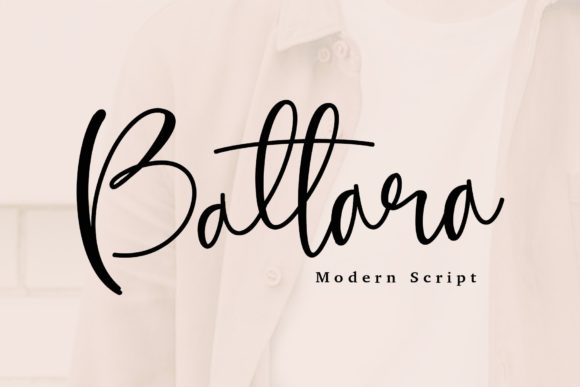
The first time I used Battara Script was on a creative portfolio site. I wanted a font that felt personal and expressive, something that could convey the handmade vibe of the client’s work. The font has a soft, flowing style with subtle swashes and natural variation. It doesn’t feel too ornate or hard to read, which is a big plus when working on web typography.
What stands out is how the font balances charm with clarity. It's not overly decorative, so it works well in both large headlines and smaller call-to-action buttons. I found it especially effective when paired with a clean sans serif for body text, creating a nice contrast that keeps the design from feeling too busy.
Using Battara Script in Website Headers
I used Battara Script for the main title of a landing page for a boutique online store. The font added a warm, inviting feel that matched the brand’s aesthetic. It worked well over a background image, where its organic shape helped it stand out without clashing.
One thing I noticed is that the font looks best at larger sizes. On mobile screens, it still holds up, but I wouldn’t recommend using it for anything smaller than 24px. For navigation menus or form labels, a simpler font would be more practical. But as a display font, it’s perfect for headings, banners, and other prominent elements.
Responsive Design and Mobile Usability
Testing Battara Script on mobile devices showed that it scales well, but again, size matters. On smaller screens, the font can appear a bit cramped if not given enough space. I made sure to adjust line spacing and padding around the text to keep it readable and visually appealing.
When placed over dark backgrounds or images, the font maintains good contrast, which is important for accessibility. I also checked how it looked on light backgrounds and found it just as legible, though slightly less striking. Overall, it performs well in responsive layouts, as long as the design accounts for its visual weight.
Pairing Battara Script with Other Fonts
Font pairing is key when using a script like Battara. I paired it with a simple sans serif for body copy on a blog redesign project. The combination created a balanced look—modern and approachable. For a more editorial feel, I tried pairing it with a serif font, which gave the site a classic, polished vibe.
It’s also great for logos or brand markups. The font adds a human touch that can make a brand feel more relatable. Just be mindful of how it looks in different weights and styles. Some variations may be more suitable for certain applications than others.
Practical Considerations for Web Use
Before implementing Battara Script on a live site, I made sure to check the available styles, weights, and file formats. The font comes in multiple variations, which is helpful for different design needs. I also verified that it supports multilingual characters, which is important for global audiences.
For web use, I recommend using the webfont version to ensure consistent rendering across devices. I also checked the licensing terms to make sure it was suitable for commercial projects. Battara Script’s license allows for use in websites, digital products, and print materials, which makes it a versatile choice for designers and clients alike.
Final Thoughts on Battara Script
Battara Script is a standout font for web designers looking to add a handwritten flair to their projects. Its balance of charm and readability makes it ideal for headers, banners, and branding elements. While it may not be the best choice for long paragraphs or small text, it shines in display roles where personality and style matter most.
Whether you're designing a creative portfolio, an online store, or a marketing campaign, Battara Script offers a fresh and engaging option. It’s a font that brings warmth to digital spaces without overwhelming the user experience. If you’re looking for a script font that feels both modern and personal, Battara Script is definitely worth trying.